

GAINS Telemetry Dongle Pro
Motorsports telemetry.
From one plug.
Everything you need to drive your fastest lap, in one plug: full vehicle, powertrain and 25 Hz GPS telemetry, a coach in your ear, a race dash on your phone or tablet, lap timing, data logging, diagnostics and synced video, streamed live through TRACK. For pro teams and weekend warriors alike, from the OBD-II port of almost any car built since 1996.
No payment to reserve · Ships March 2027
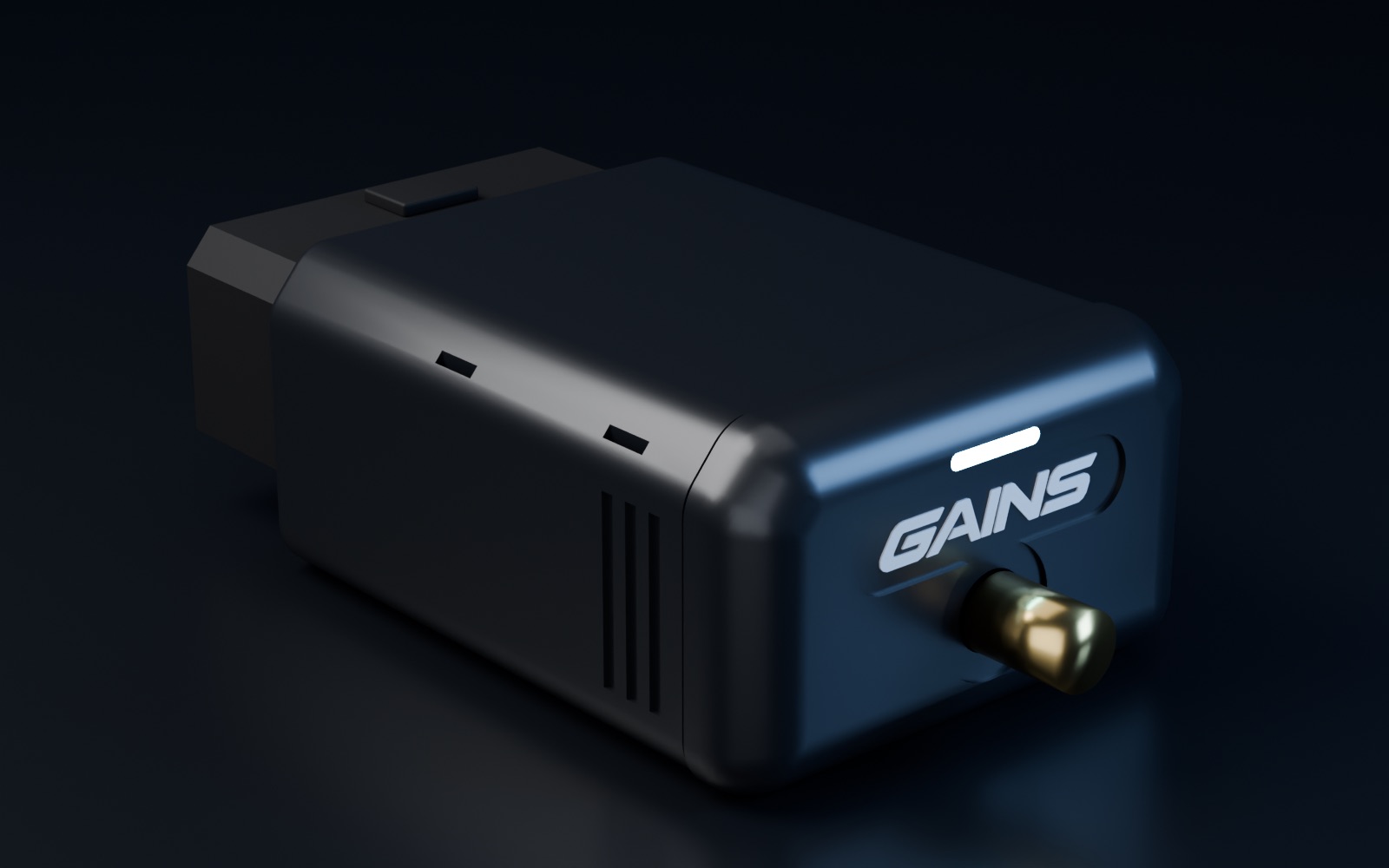
Drag to turn · pre-release design
One plug. Eight jobs.
No other device does all of this.
None does it on one clock.
Telemetry, coaching, displays, logging, timing, diagnostics, video and live streaming usually mean a bag of gadgets that never quite agree. Here it's one plug, one clock and one app, built around a single goal: your fastest lap.
Every input, every output, on one clock.
Engine, powertrain and chassis data straight from the car's own network, fused with 25 Hz GPS and a motion sensor. See exactly what you and the car did, everywhere on the lap.
- Up to 60 channels per car
- Steering, brakes, pedals, wheel speeds, temperatures
- Time-stamped at the plug, no phone jitter
The channels
60 channels of meaningful data.
Drive your optimal lap.
Modern cars already send steering angle, brake pressure, all four wheel speeds, yaw and pedal positions around their own network many times a second. A basic OBD reader asks for one number at a time and never sees them. The Telemetry Dongle Pro reads that stream, asks the PCM and body modules for the rest, and adds its own GPS and motion data. See how it handles your car.
Engine 10
- Engine speed3233rpmCAN 0x140
- Engine torque80NmCAN 0x141
- Calculated engine load18%OBD-II
- Ignition timing advance30.0°OBD-II
Driver inputs 8
- Steering angle75.7°CAN 0x0D0
- Brake pressure92.0barCAN 0x0D1
- Accelerator pedal0%CAN 0x140
- Throttle position0%CAN 0x140
Chassis and wheels 8
- Yaw rate-13.3°/sCAN 0x0D0
- Lateral accel (car)-1.22gCAN 0x0D0
- Longitudinal accel (car)-1.30gCAN 0x0D0
- Vehicle speed186km/hCAN 0x0D1
Temperatures and fluids 2
- Oil temperature114°CCAN 0x360
- Coolant temperature95°CCAN 0x360
GPS, 25 Hz 7
- Latitude36.586123°GNSS
- Longitude-121.758745°GNSS
- GPS speed186km/hGNSS
- Heading331°GNSS
Motion (IMU) 6
- Accel X (long)-1.30gIMU
- Accel Y (lat)-1.22gIMU
- Accel Z (vert)1.04gIMU
- Roll rate-1.4°/sIMU
Computed on one clock 10
- Lap time0:36.96Computed
- Predicted lap1:27.67Computed
- Delta to best−0.36sComputed
- SectorS2Computed
Channel maps per car from community-sourced definitions (CAN IDs shown); each is confirmed on the car by a capture before we call it tested. Values are simulated from a demo lap. Standard OBD-II channels depend on what the engine reports. Cars without public data yet, such as the Lotus Evora, BMW M2 or Nissan GT-R, get their track channels from GAINS discovery over the car's CAN network.
Your car
What will your car send?
Find out in seconds.
Search or pick your year, make and model to see the channels the Telemetry Dongle Pro reads on your car: from its own data stream, from OBD-II requests, and the track channels GAINS discovery learns from a short capture. 350 models, 1996 to today.
Mazda MX-5 Miata
ND · 2016–2026
CAN on the OBD-II port- Engine RPM
- Vehicle speed
- Accelerator pedal
- Brake pressure
- Steering angle
- Steering rate
- Clutch pedal
- Wheel speed, front left
- Wheel speed, front right
- Wheel speed, rear left
- Wheel speed, rear right
- Lateral g
- +17 more
Synchronised
One clock.
Engine, chassis and GPS.
Data only explains a corner when every channel agrees on when things happened. The brake pressure rise, the steering input, the speed at the apex and the GPS line all land on the same timeline, so a lap reads the way a pro team's logger reads it.
Every CAN frame, OBD-II reply, GPS fix and IMU sample is time-stamped on the dongle, on one clock. No phone timing jitter in your data.
The car's own network carries steering, brake pressure, wheel speeds and pedals many times a second. The dongle reads that stream as it goes by, then asks the engine for the rest.
Position, speed and heading 25 times a second, with a 6-axis motion sensor between fixes. No second box on the dash.
CAN FD on newer cars, classic CAN on most cars from 2008, and K-line (ISO 9141 and KWP2000) on many earlier OBD-II cars: almost 30 years of cars.
Real-time coaching in TRACK
A coach in the car.
Every lap.
The dongle streams to TRACK, the lap-timing and coaching app. Sectors and a predictive delta while you drive, spoken cues between corners, and a plan for the next session when you stop.
- S1—
- S2—
- S3—
Know mid-corner if the lap is on, against your best or a reference lap.
Your theoretical best lap, built from your best sectors, is the target for the next one.
Short calls between corners: brake later into turn 3, carry more speed through turn 1.
Where the time went, corner by corner, and the one change worth the most next time out.
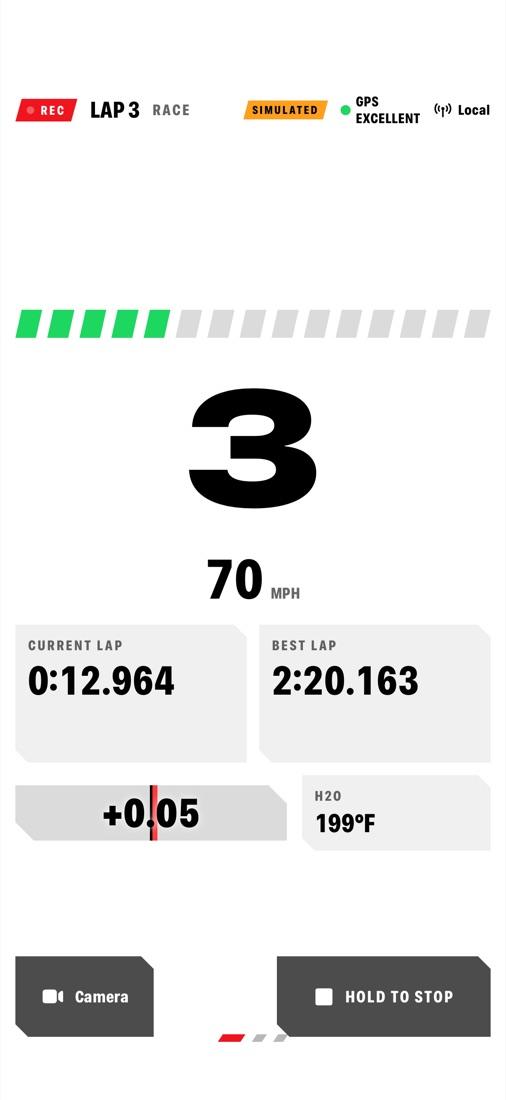
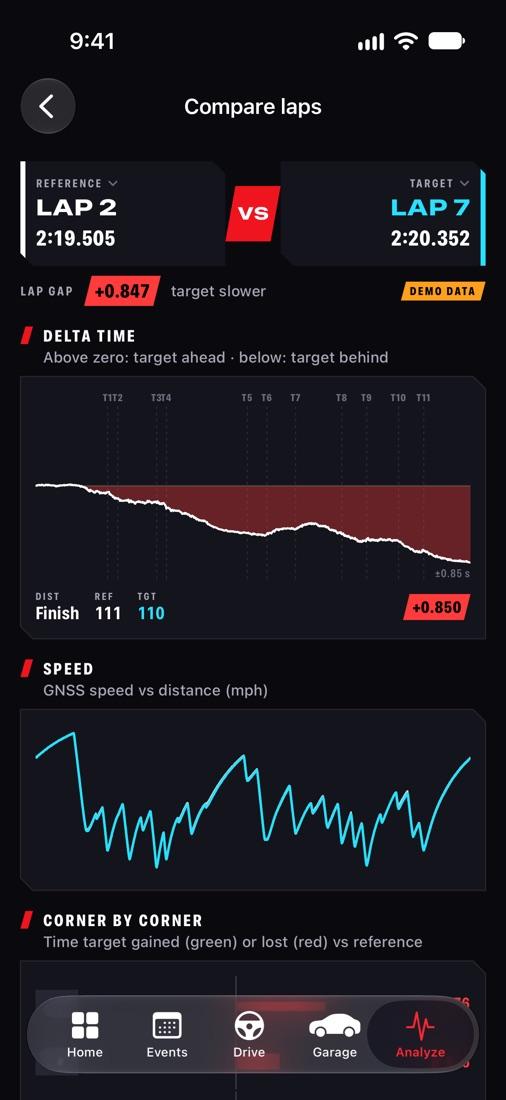
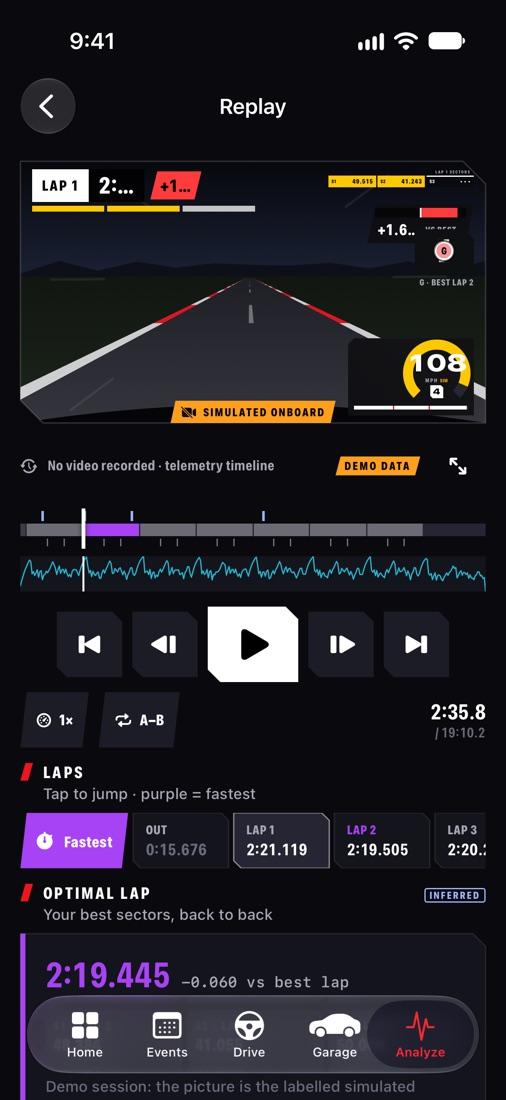
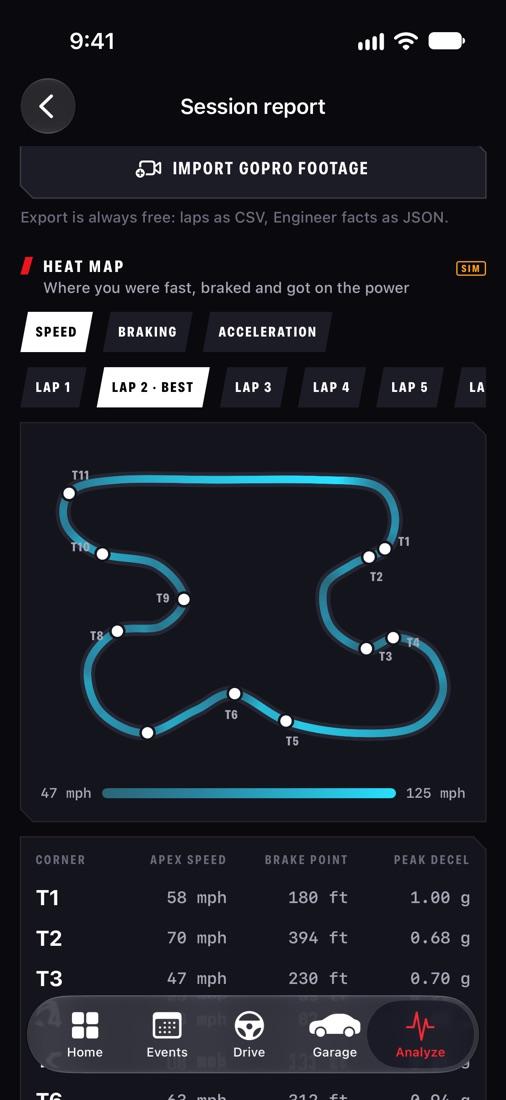
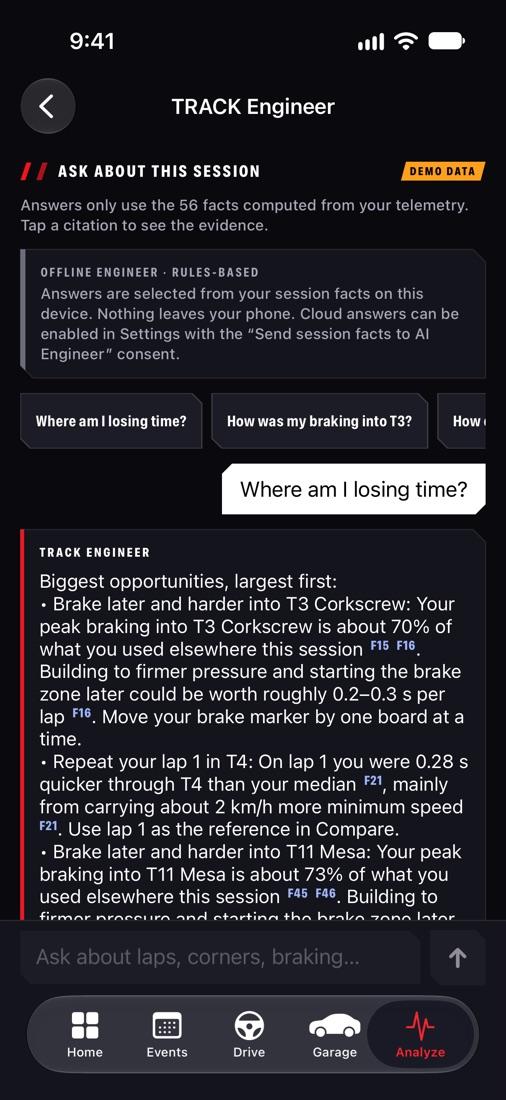
Lap timer on an invented circuit with a synthetic lap. TRACK screens on demo session data; coaching features are planned.
Sector and corner analysis
Find the time.
Corner by corner.
Every lap lands in TRACK at full rate: speed, pedals, g and the time delta on one cursor, the track coloured by speed, and a corner table that shows where the lap went. The view race engineers use, on your own laps. Try it.
Drag across the traces, or use the arrow keys
- Distance
- 1,984 m
- Speed
- 72 64 km/h
- Throttle · brake
- 0% · 100%
- Lateral
- 0.22 g
- Delta to best
- +1.139 s
| Corner | Brake point | Min speed | Exit speed | Time |
|---|---|---|---|---|
| T1 | 168 m (+0) | 68 (−5.2) | 118 km/h | +0.49 s |
| T2 | 168 m (+0) | 108 (−1.2) | 137 km/h | +0.08 s |
| T3 | 136 m (−16) | 63 (−1.3) | 111 km/h | +0.50 s |
| T4 | 168 m (+0) | 82 (−1.2) | 121 km/h | +0.12 s |
Interactive demo on two synthetic laps of an invented 3.2 km circuit, not recorded data.
In-car dash
No dash to buy.
It's already in your pocket.
Mount the phone or tablet you own. TRACK draws a full race dash from the dongle's data: predicted lap and live delta, rpm with shift lights, gear and speed, temperatures and pedals, with an alert the moment a limit is crossed. No display, no loom, no install.
TRACK's Cockpit page on simulated values. Tiles with no source on a car show as “No source” until a CAN channel or sensor provides them.
Video
Produce exemplary
video content.
Record the session on your phone or GoPro and TRACK lines up every video frame with the telemetry from the Telemetry Dongle Pro. TRACK outputs clean, beautiful video worthy of an F1 broadcast.
Your phone or a GoPro records the session, lined up on the same clock as the data: every frame lines up with speed, pedals and steering.
Speed, gear, g, delta and the track map drawn over the video, ready to share.
Your best lap, each corner and every lap that beat your best, cut from the session automatically.
Two laps played together, synced by distance, so you see exactly where one gains on the other.
Stream the session through TRACK as it happens: lap times, delta and position for your team, your coach or friends at home.
Health and maintenance
Know before
it breaks.
Telemetry Dongle Pro also proactively watches your car via DTC codes and powertrain parameters. It reads fault codes while you drive and tells you about a problem as it develops on track, not after it's too late. Back in the garage, it's a full diagnostic tool.
Set limits on coolant, oil and gearbox temperature, oil pressure and battery voltage. Cross one, or let the car log a new fault code, and the dash flashes and TRACK says it out loud, so you can back off and come in.
Read stored, pending and permanent fault codes with a plain-language explanation, the freeze-frame data from the moment each was set, readiness monitors and live data. Engine codes on every OBD-II car; gearbox and other modules where the car allows.
Every session adds to a history: fuel trims drifting, temperatures against the weather, codes that come and go. Spot the trend before it becomes a failure.
Above your 120 °C limit for 2 laps. Ease off and cool down.
Coolant below the thermostat regulating temperature. Often a thermostat sticking open.
Inside your limits all session. Peak 118 °C on lap 5.
- Catalyst
- Oxygen sensor
- Misfire
- Fuel system
- EVAP
- O₂ heater
Simulated example. Health alerts and diagnostics in TRACK are planned features.
CAN FD
Ready for the next
generation of cars.
Newer cars are moving from classic CAN to CAN FD: up to eight times the data in every frame, sent at a faster data rate. A classic-CAN dongle can't read those frames. The Telemetry Dongle Pro has a dedicated CAN FD controller, so it reads both.
Just released, on CAN FD
- Chevrolet Corvette ZR1X2026
- Chevrolet Corvette ZR12025–26
- Corvette Z06 and E-Ray2023–26
- Cadillac CT5-V Blackwing2022–26
- Cadillac CT4-V Blackwing2022–25
- Ford Mustang GTD2025–26
- Ford Mustang Dark Horse2024–26
As new cars move their networks to CAN FD, the dongle keeps up. Change cars and it comes with you.
One controller reads both on the OBD-II port, so mixed networks are no problem: classic frames and FD frames on the same timeline.
It listens on CAN FD just as it does on classic CAN: no acknowledgements, no error frames, nothing sent onto the car's network.
Open by design
Your data.
Your tools.
TRACK is where the Telemetry Dongle Pro does the most, but it isn't a walled garden. Stream live to the app you like, or take the full-rate log into the analysis suite your team already runs. One standard, built to be adopted everywhere.
The full experience: in-car dash, real-time coaching, sector and corner analysis and synchronised video, built around the dongle.
RaceChrono works out of the box through its own DIY Bluetooth interface, with a ready-made channel setup for each car. Apps that use an OBD-II reader or an external GPS connect too, and an open, documented interface gives any app the full data.
Take the full-rate log off the dongle and analyse it in the suite your team already uses: MoTeC i2, AiM Race Studio and others.
Every channel as plain CSV with one time column, for Excel, Python or your own engineering tools.
Building an app? See how the Telemetry Dongle Pro works with third-party apps. RaceChrono, MoTeC, i2, AiM and Race Studio are trademarks of their owners, named only to describe compatibility. No partnership or endorsement is implied.
Not another Bluetooth dongle
More than an OBD reader.
More than a GPS timer.
A basic OBD reader polls the engine one value at a time. A GPS timer knows where you are but not what the car is doing. This does both, on one clock, in one plug.
| Feature | Telemetry Dongle Pro | Typical Bluetooth OBD reader | OBD reader + separate GPS meter |
|---|---|---|---|
| GPS for lap timing | 25 Hz, built in | — | Separate GPS meter |
| Motion sensor (g, yaw) | 6-axis, built in | — | In the GPS meter |
| Car's broadcast data (steering, brakes, wheel speeds) | Read from the stream | Rarely | Some, in one app |
| Engine data (OBD-II) | ✓ | One value at a time | ✓ |
| Engine, chassis and GPS on one clock | ✓ | — | Two devices, two clocks |
| Logs without the phone | About 30 h onboard | — | GPS only |
| CAN FD cars | Classic CAN and CAN FD | Rarely | Rarely |
| K-line cars (1996–2007) | ✓ | Some | Some |
| Fault codes + live health alerts on track | Codes, freeze frame, alerts | Codes only | Codes only, in one app |
| Use any app, export to pro analysis suites | TRACK, other apps, MoTeC / AiM | Its own app list | Usually one ecosystem |
| Boxes to buy and mount | One plug | One, plus a GPS | Two |
Performance runs, timed from 25 Hz GPS and logged with the car's own data:
- 0–60 mph
- 0–100 km/h
- 60–130 mph
- 100–200 km/h
- ¼ mile
- ⅛ mile
- 60–0 mph braking
- Roll-ons in any gear
Comparison with generic product categories from public listings, November 2026. Performance-run timing is a planned TRACK feature.
What it replaces
A bag of gadgets.
For the price of one.
Add up what it takes to get the same jobs done with separate devices. Untick anything you already own: the Telemetry Dongle Pro still comes out ahead, and none of those boxes coach you, sync your video or stream to the pit wall.
Save at least $1,521, and get the coaching, synced video and live streaming no single box does.
Reserve at $249Typical US street prices by device category, November 2026. TRACK app features as described on this page.
Who it's for
The pit garage.
And the daily driver.
Race teams
A data system on every car for the price of a set of pads. Engine, chassis and GPS on one timeline, a dash on the driver's screen, and sessions the engineer reviews in TRACK the moment the car is in.
- One unit per car, logged with or without a phone
- Driver against driver in the same car
- Sector and corner reports for the debrief
DE and track-day drivers
Plug it in at the paddock, drive home on Monday. Your phone becomes the dash and the coach, and every session builds a picture of where the next second is.
- No wiring, no tools, no screen to mount
- Real-time coaching and lap timing in TRACK
- Read-only: your car stays exactly as it is
Will it fit my car?
Almost 30 years
of OBD-II cars.
One plug in the OBD-II port, read-only, always: it listens to the car and asks standard questions, and never writes to the ECU.
GM from 2020, including the Corvette and Cadillac V-Series Blackwing, and more makes every model year.
The car's own broadcast data plus standard and enhanced OBD-II requests.
ISO 9141 and KWP2000 engine data for older OBD-II cars.
Some pre-2008 GM and Ford models.
Design
Everything,
in the plug.
No pod on a cable and no second box. The shell follows the outline of the OBD-II plug itself, with grip ribs, a light bar that shows the link, and an antenna port for cars whose port can't see the sky.
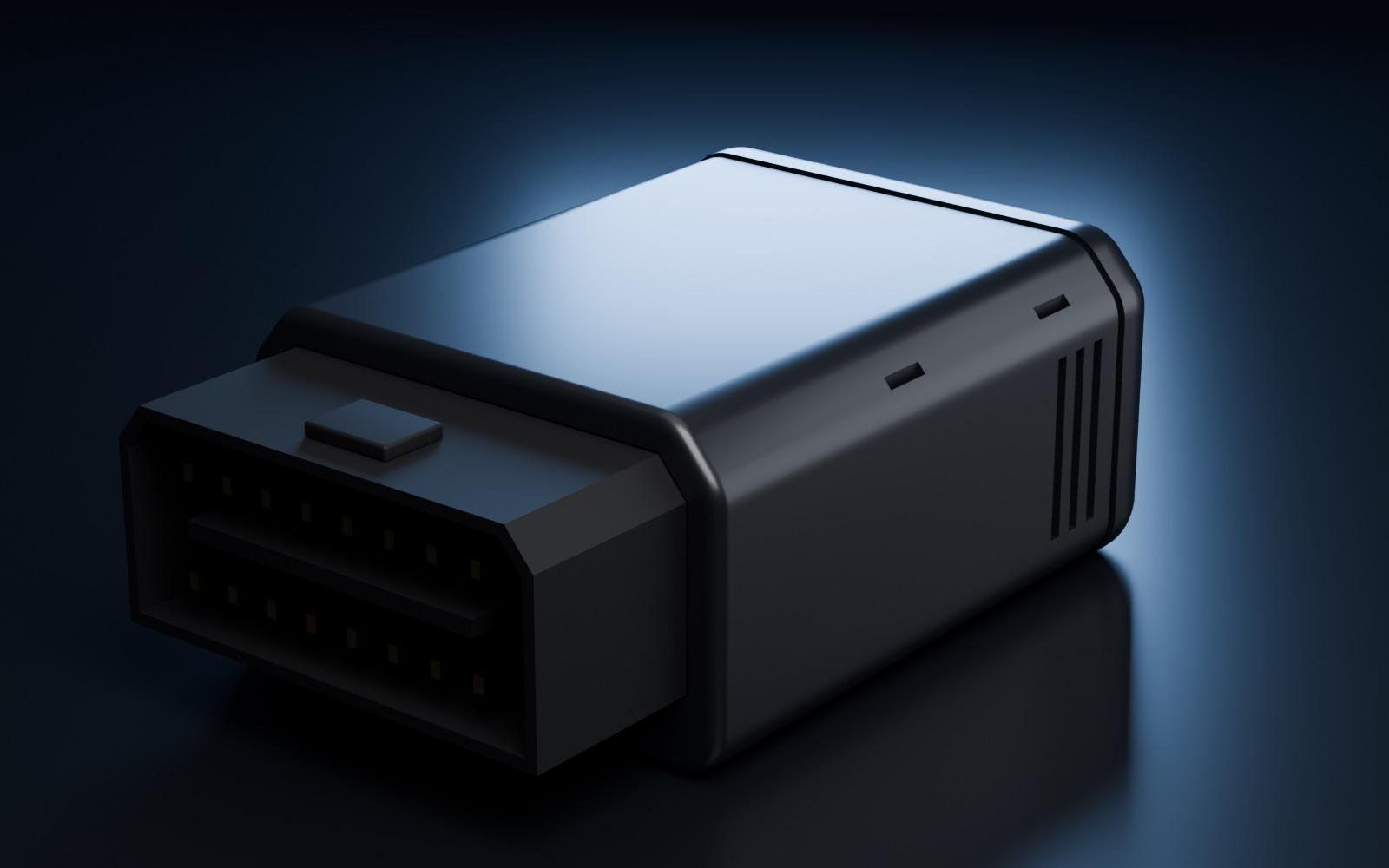
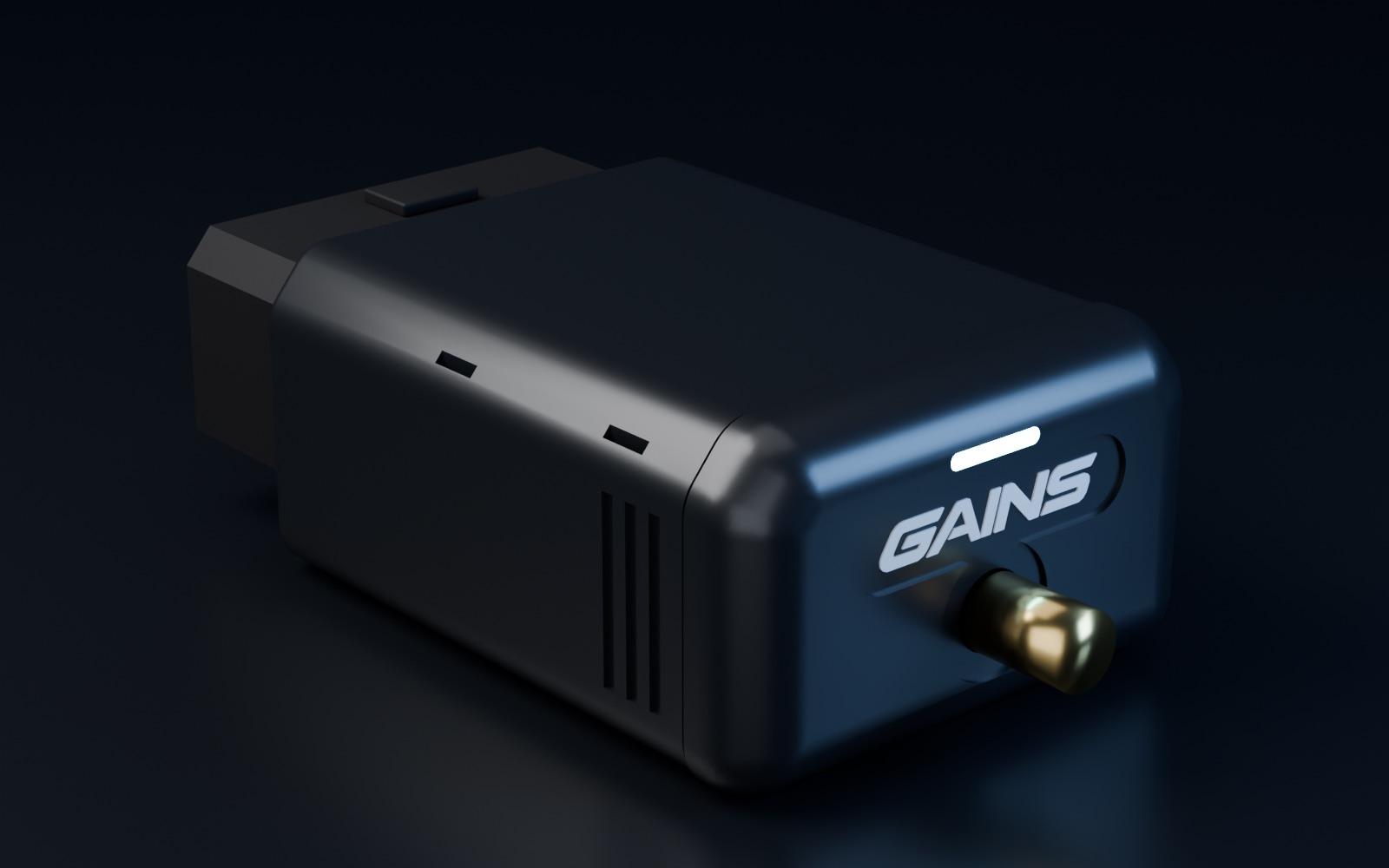
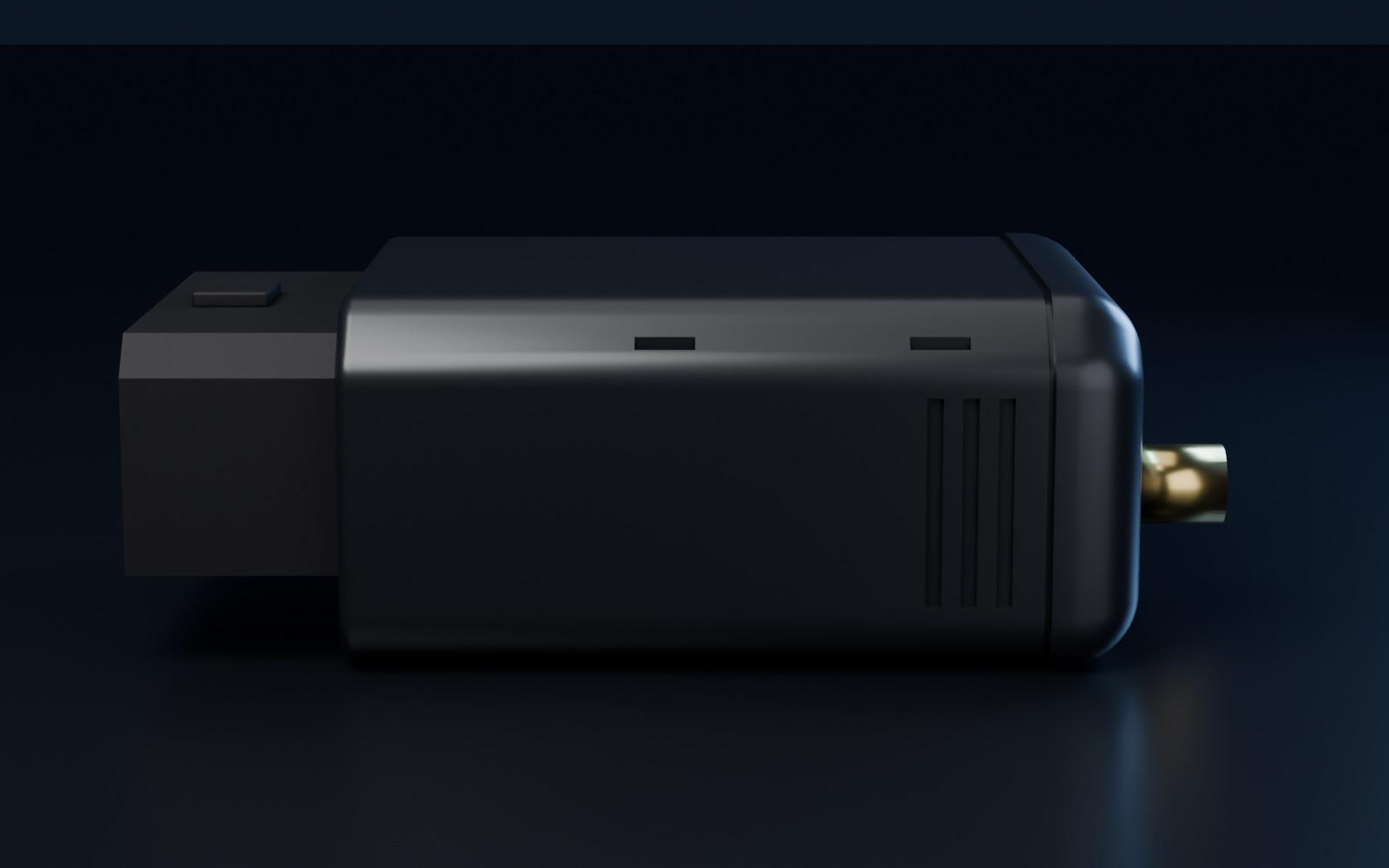
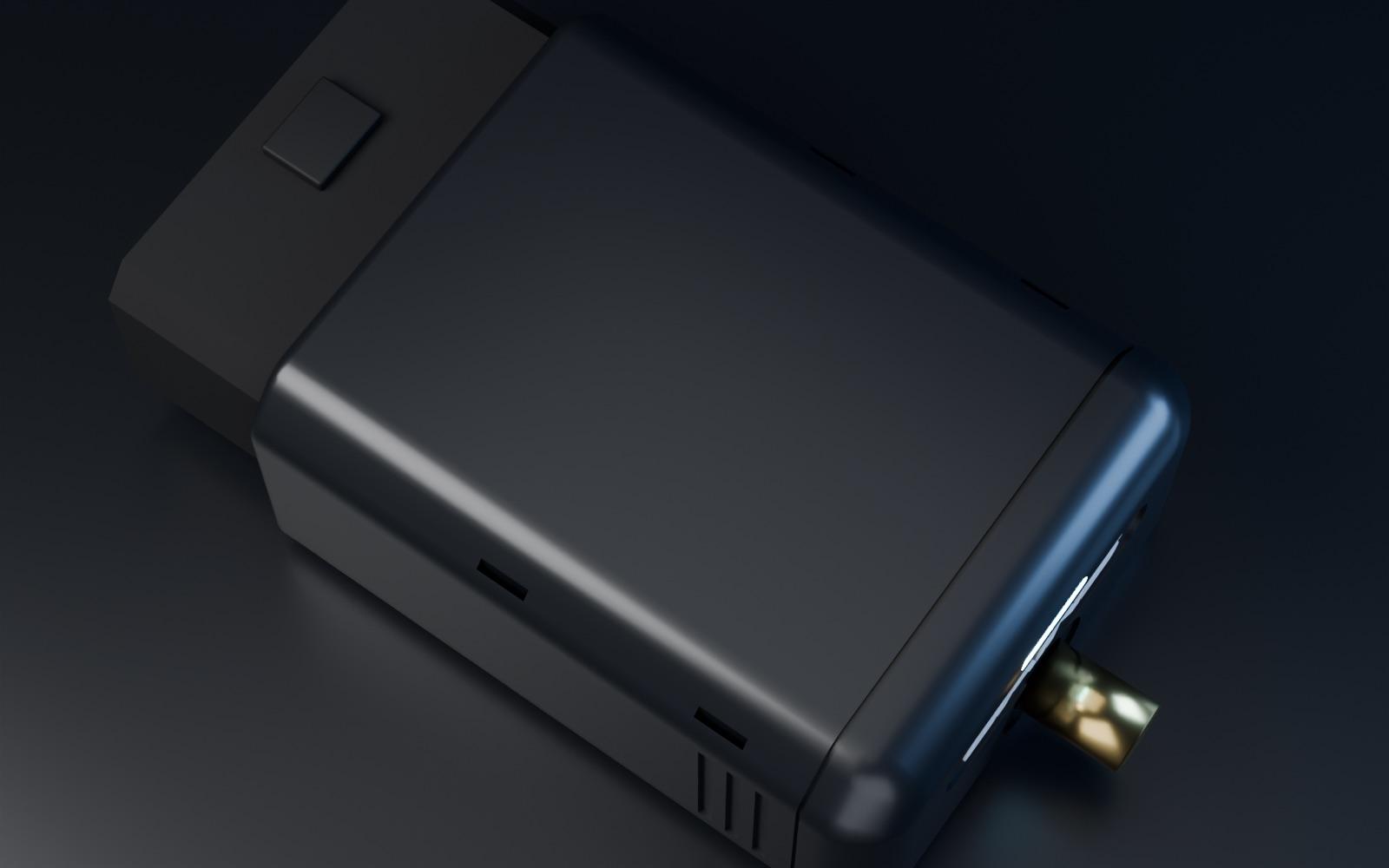
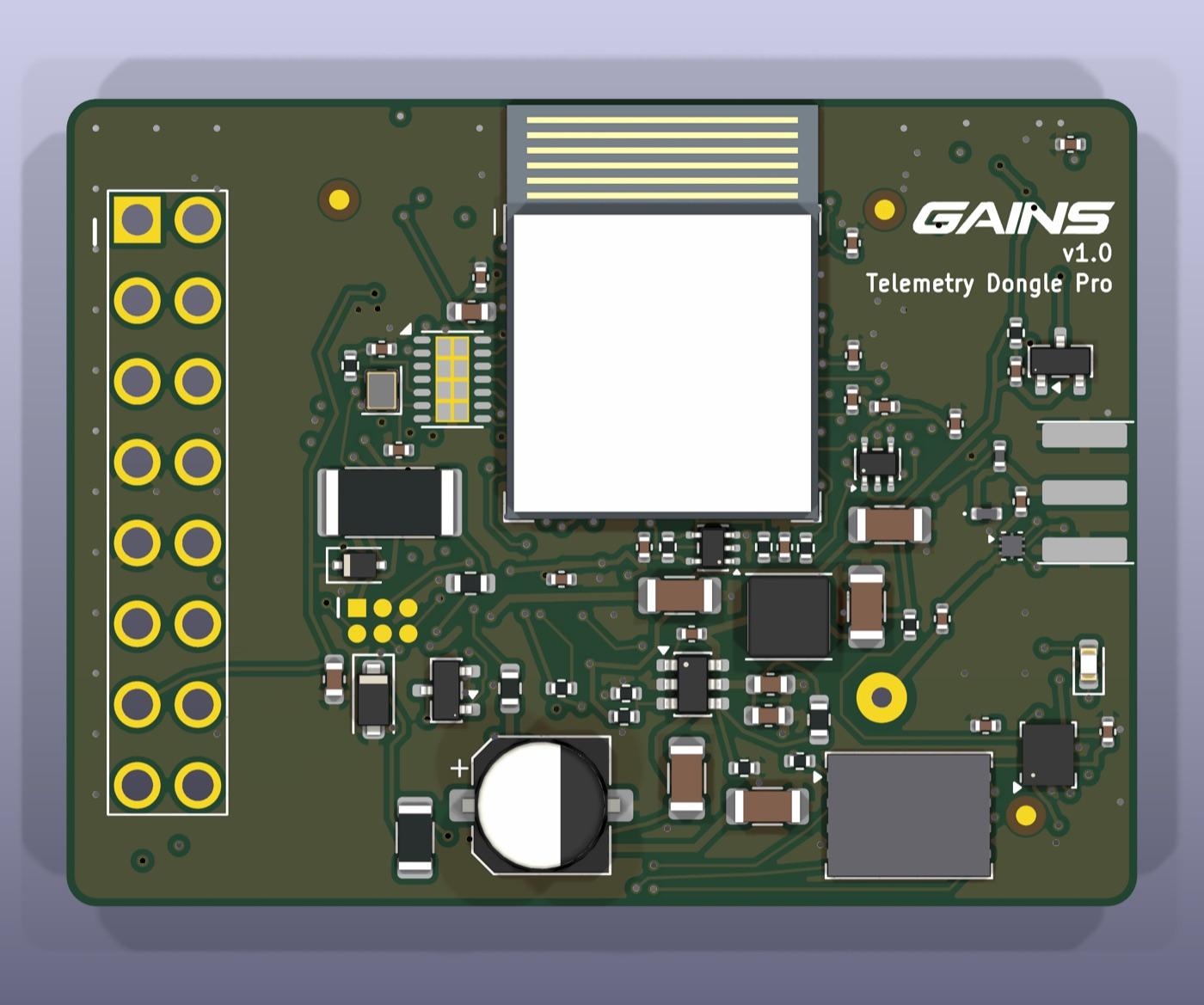
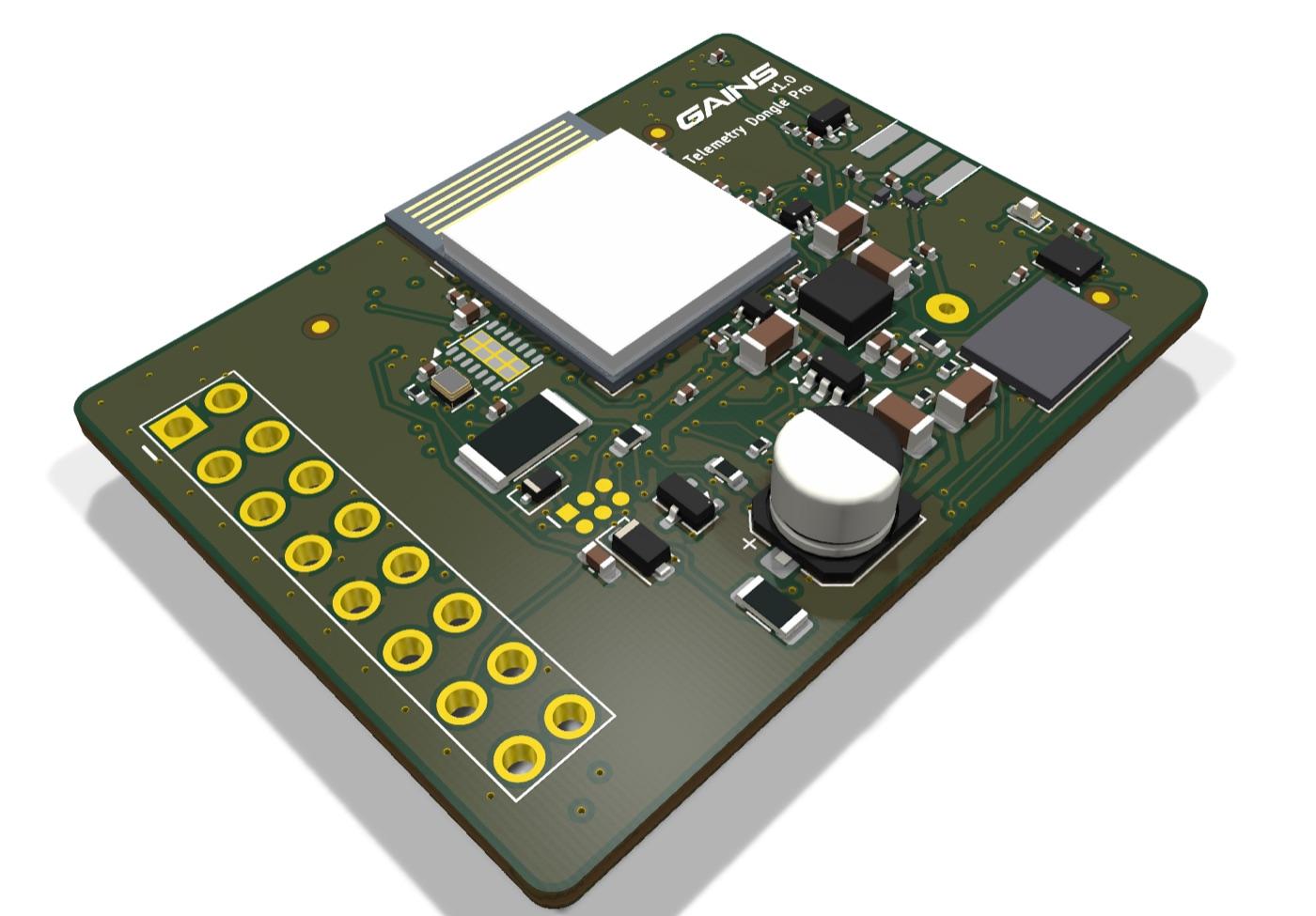
Pre-release renders from the design files. Finish and details may change before launch.
Track day
Plug, pair,
drive.
- 01Plug in
Into the OBD-II port under the dash. No wiring, no tools.
- 02Pair
Open TRACK; the dongle pairs over Bluetooth and locks GPS while the car warms up.
- 03Drive
Live dash, delta and coaching on your screen. The dongle logs every lap even if the phone drops out.
- 04Debrief
The session syncs in the pits. Sectors, corners, video and where the next second is.
Specifications
The details.
- Position
- 25 Hz GNSS, built-in patch antenna, SMA port for an optional dash-top antenna
- Motion
- 6-axis IMU: acceleration and rotation rates
- Car data
- The car's own CAN broadcast plus standard and enhanced OBD-II requests (CAN, most cars from 2008); K-line ISO 9141 / KWP2000 (many 1996–2007 cars)
- CAN FD
- Dedicated CAN FD controller on OBD-II pins 6 / 14: classic CAN and CAN FD frames up to 64 bytes, data phase up to 8 Mbit/s; listen-only by default
- Timing
- Every sample time-stamped on the dongle, one clock for car, GPS and motion data
- Diagnostics
- Reads stored, pending and permanent fault codes, freeze-frame data, readiness monitors and live engine data; gearbox and other modules where the car allows. Read-only: codes are read, never cleared
- Not supported
- SAE J1850 cars (some pre-2008 GM and Ford)
- Logging
- Onboard memory, about 30 hours; Wi-Fi sync after the session
- Wireless
- Bluetooth LE live stream and Wi-Fi
- Power
- From the OBD-II port; sleeps at key-off
- Size
- Approx. 75 × 47 × 28 mm including the plug
- Safety
- Read-only: never writes to your ECU, never touches immobiliser or emissions systems
- Apps
- TRACK (recommended): dash, lap timing, coaching, analysis and video; the GAINS app; any data-logging app whose developer supports the open Bluetooth LE / Wi-Fi interface
- Data out
- Full-rate session logs for MoTeC i2, AiM Race Studio and other analysis suites, and plain CSV
Design targets. Final specifications and supported channels per car are published from test logs before orders open.
Pro or weekend warrior
Your fastest lap is in there.
Go find it.
Whether you race for a team or drive your daily to the track on Saturday, the Telemetry Dongle Pro shows you where the time is, coaches you to it, and proves it on video.
Launch Edition: first 100 units · No payment to reserve · Ships March 2027
Launch Edition
$249 for the first 100. Then $349.
- No payment to reserve
- Ships March 2027
- Served in order: the first 100 reservations hold $249
What do I pay now?
Nothing. A reservation holds a Launch Edition unit at $249. We email you before orders open, and you decide then.
What happens after the first 100?
The Launch Edition is the first 100 units. Reservations are served in the order they were made; after the first 100, the Telemetry Dongle Pro is $349.
When does it ship?
March 2027 is the target for the first units. We'll tell reservation holders first if that moves.
Which channels will my car give me?
It depends on what your car's network carries. Use the car lookup on this page, or the vehicle data library: it lists the channels expected for each model and year, and the ones we've confirmed with our own captures.
Does it work on newer cars with CAN FD?
Yes. A dedicated CAN FD controller reads both classic CAN and CAN FD on the OBD-II port: newer GM cars such as the Corvette and Cadillac V-Series Blackwing, and the latest Ford Mustang, already use it. What each car exposes on its port still varies: check your car in the vehicle data library.
Is it really for pro teams?
Yes: one clock for engine, chassis and GPS data, onboard logging and corner-by-corner analysis are what a team needs from a data system. It's priced so every car, and every DE driver, can have one.
Do I have to use TRACK?
No. TRACK is the app we recommend and build for, but RaceChrono works out of the box, apps that use an OBD-II reader or an external GPS connect too, any app can use the open Bluetooth LE and Wi-Fi interface, and its logs open in MoTeC, AiM and other analysis suites.
Can it read check-engine codes?
Yes: stored, pending and permanent codes with what they mean and the freeze-frame data from when they were set, on track or in the garage. It reads codes but never clears them, because it never writes to the car.
Do I need a dash display?
No. TRACK turns the phone or tablet you already own into the dash, with lap timing, live delta and alerts.
Can it change my tune or harm the car?
It is read-only. It listens to the car's data and asks standard OBD-II questions; it never writes to the ECU.
Where does the GPS go if my port is low under the dash?
The antenna is built in. If your port has a poor view of the sky, an optional antenna fits the SMA port and sits on the dash.